01
facebook_list_groups Discover & Select
Reads your joined groups list and returns their names, IDs, and links so your agent can ask you which communities to research.
Search your joined groups, read relevant discussions, and give your AI agent context to work with.
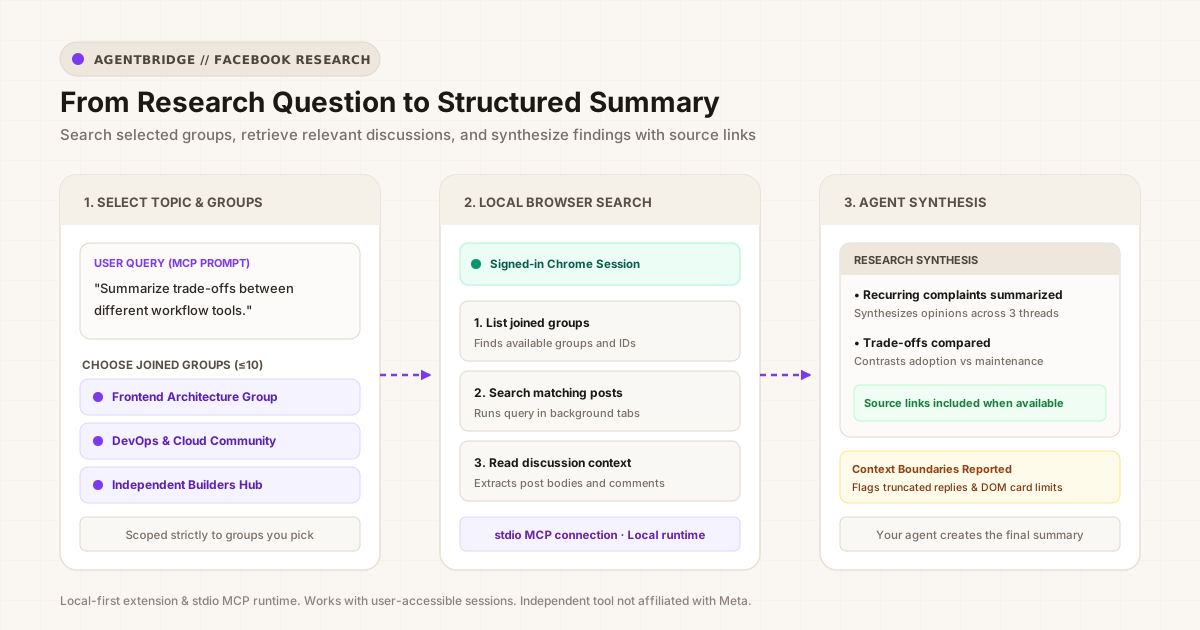
When evaluating developer tools, market trends, or community feedback, the most practical insights are often scattered across several Facebook communities. Manually searching each group, opening individual posts, and reading comments is slow and tedious.
With Facebook Group Search, you give your agent a specific topic and choose up to 10 joined groups. Your agent coordinates the search in the background, retrieving grounded discussions directly from your authenticated browser session.
"List my available groups, then search the 3 developer communities I select for discussions about project management tools. Read the top posts and summarize recurring complaints with links."
The capability is broken into three distinct semantic tools exposed to your agent over MCP:
Reads your joined groups list and returns their names, IDs, and links so your agent can ask you which communities to research.
Runs your search across up to 10 selected groups in background tabs. Collects and deduplicates matching posts with recency filters.
Retrieves the full post body and visible comments for specific posts. When a standalone link is unavailable, it extracts discussion text directly from the rendered card.
Clear boundaries separate your local browser session from downstream model reasoning.
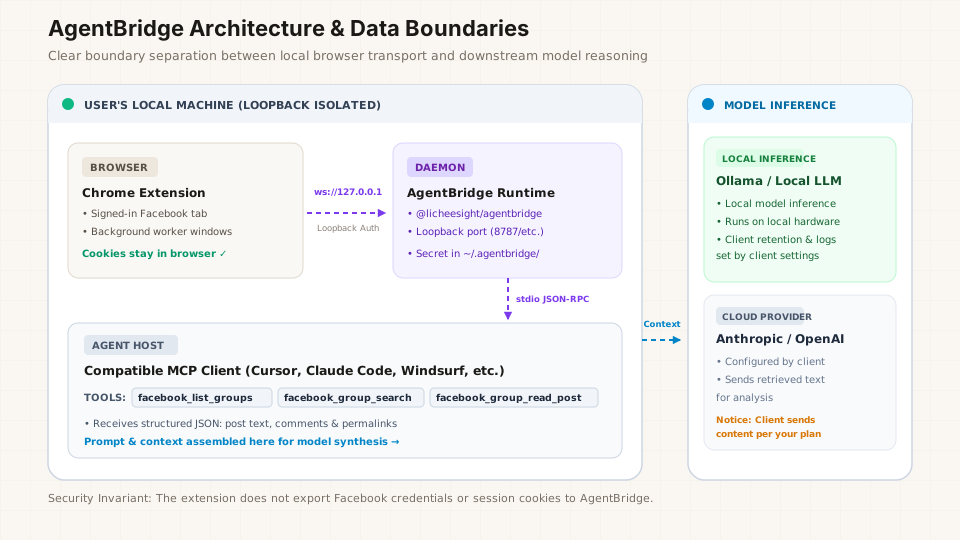
The companion @licheesight/agentbridge runtime binds exclusively to 127.0.0.1. It communicates over an authenticated local WebSocket link.
Your Facebook login cookies, passwords, and session tokens remain inside Chrome. The extension does not export credentials to AgentBridge or write them into configuration files.
The extension and runtime provide local transport. Once discussion text is retrieved, where it is sent depends on your MCP client and model configuration: local models process data on your machine, while cloud providers receive text per your client's API setup.
Install the extension from the Chrome Web Store and keep your Facebook account signed in.
Run the official local runtime from your terminal:
npx -y @licheesight/agentbridgeOpen the printed pairing link (http://127.0.0.1:8787/connect) in Chrome and click Confirm & Connect.
Generate configuration for Cursor, Claude Code, Windsurf, or generic MCP clients:
npx -y @licheesight/agentbridge setup --client cursor
AgentBridge connects with MCP clients using standard local stdio. The CLI includes setup commands that generate configuration snippets for tools like Cursor, Claude Code, and Windsurf (via npx -y @licheesight/agentbridge setup --client <name>), and works with any environment that can launch a local stdio MCP server process.
No. The extension relies on an active Chrome session to interact with Facebook's rendered DOM. Chrome must be open with your Facebook session signed in.
No. The extension executes scoped keyword searches through Facebook's native search interface, then retrieves and ranks rendered posts. Your downstream AI agent performs semantic synthesis and analysis over the retrieved results.
No. Neither the Chrome extension nor the local AgentBridge runtime uploads your Facebook posts, cookies, or credentials to any LicheeSight server. All inter-process communication occurs strictly over local loopback (127.0.0.1).
Install the Chrome extension and start connecting your agent with AgentBridge.