Scan Page
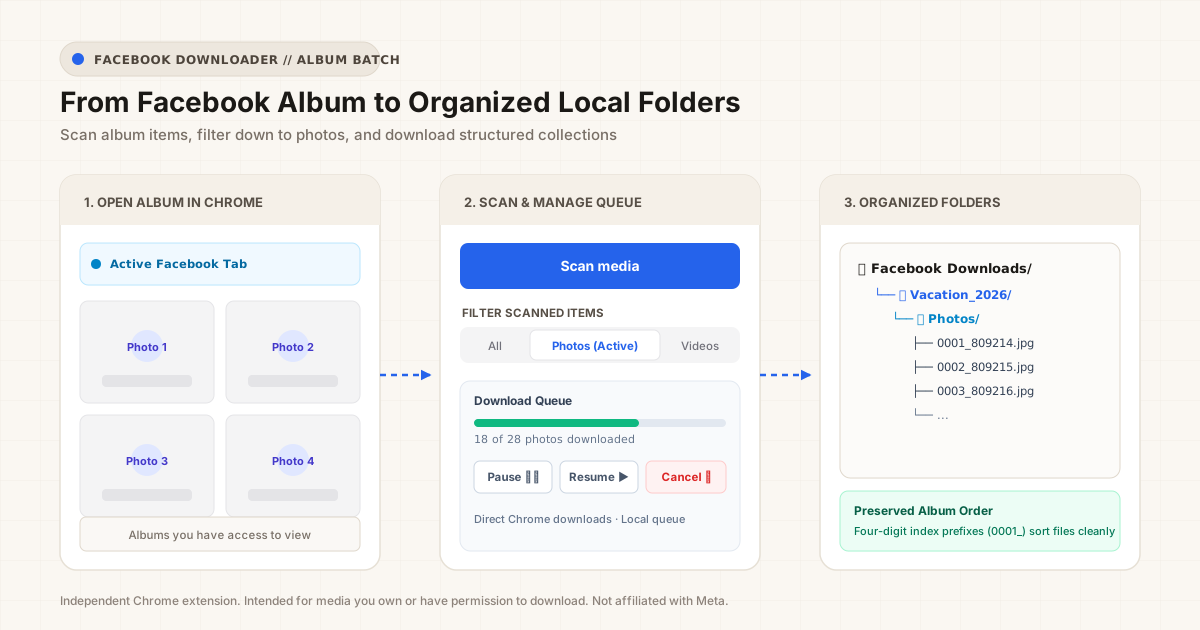
Click Scan media. The extension scrolls down the page to register photo IDs and then returns you smoothly to your original position.

Save album photos in batches, control the download queue, and keep your files organized.
Saving a single photo from Facebook is easy. But working through an album with 40, 80, or 150 pictures quickly becomes frustrating: you have to click each thumbnail, open the full-resolution preview, right-click to save, and manually rename cryptic filenames.
Facebook Downloader scans the album surface to identify full-resolution image sources and downloads the batch sequentially into a dedicated folder on your computer.
Built for speed and control without unexpected popups or page reloads.
Click Scan media. The extension scrolls down the page to register photo IDs and then returns you smoothly to your original position.
Switch between All, Photos, and Videos with one click. Changing filters takes effect instantly without re-scanning.
Start sequential batch downloading. Pause if you need connection bandwidth, resume when ready, or cancel the remaining queue anytime.
Instead of dumping hundreds of arbitrarily named files into your generic Downloads folder, Facebook Downloader creates clean, predictable folder trees:
📁 Facebook Downloads/
└── 📁 Vacation_2026/
└── 📁 Photos/
├── 0001_809214.jpg
├── 0002_809215.jpg
├── 0003_809216.jpg
└── ...
The four-digit index prefix (0001_, 0002_) preserves your album's original viewing order, while the Facebook media ID prevents duplicate naming conflicts.
Facebook Downloads/<Source>/Photos/.Video downloads are handled through two distinct processing modes:
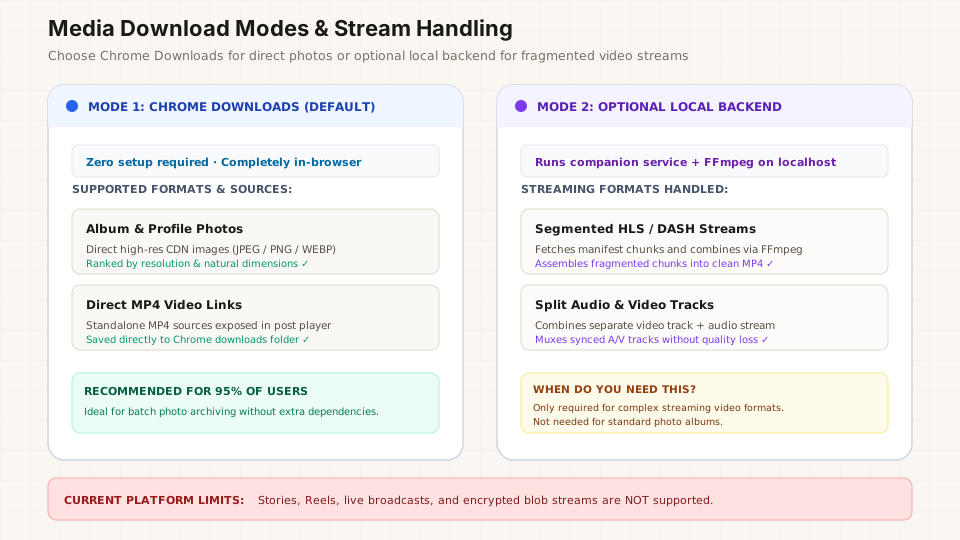
Direct MP4 video URLs exposed by Facebook post players are saved straight through Chrome's native download manager. Zero additional setup or local services required.
For segmented streams (HLS, DASH, or split audio/video tracks), an optional local companion service with FFmpeg can stitch chunks into standard MP4 files. This backend is strictly optional and never needed for standard photo albums.
Yes. The core photo and standalone video download features are free to use.
No. Media discovery and download processing run directly inside your browser. No Facebook photos, credentials, or session cookies are uploaded to remote servers.
No. Photo downloads work directly through native Chrome Downloads without requiring command-line tools or companion servers.
No. Facebook Downloader is an independent utility developed by LicheeSight and is not affiliated with, endorsed by, or sponsored by Meta or Facebook.
Read our step-by-step walkthrough to get the most out of Facebook Downloader.