You already have an AI account. Then an extension asks you to open a developer console, find the API section, create a key, copy it, paste it into Settings, and work out which model or billing option to choose.
For many users, that setup feels backwards: Why can’t I just use the AI account I already have?
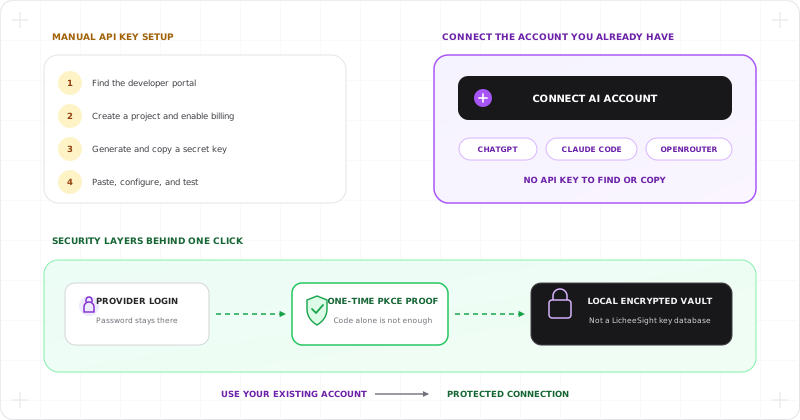
That is the friction OAuth with PKCE can remove. When a compatible provider supports it, you select Connect, sign in on the provider’s own website, approve access, and return to the extension. There is no API key for you to find or copy.
PKCE makes this simpler connection safer for a browser extension. It lets the extension prove that it started the connection without trying to hide a permanent secret in code that anyone can download and inspect.
In Your AI Translator, this is a provider connection for using supported AI features. It is not a “Continue with ChatGPT” sign-in for LicheeSight, and it does not replace LicheeSight account, subscription, or device-limit rules.
OAuth availability, eligible plans, model access, quotas, and provider policies can change. Having an account does not automatically mean that every provider permits third-party model access. API-key connections remain available where supported.
1. The Real Problem: API Keys Add Setup Friction
API keys are useful. They give technical users direct control over providers, projects, budgets, and revocation. But they are not a friendly first step for everyone.
A new user may need to:
- Find the correct developer portal—not the normal chat website.
- Understand the difference between a chat subscription and API billing.
- Create a project or enable billing.
- Generate a key and avoid exposing it while copying.
- Return to the extension and select a compatible model.
Every extra step creates another place to stop, make a mistake, or wonder whether the product is trustworthy. It is especially frustrating for someone who already has an eligible ChatGPT, Claude, OpenRouter, Copilot, or other supported account.
OAuth changes the first-run experience from “bring a secret you created elsewhere” to “connect an account you already use.” PKCE is the protection that makes that flow appropriate for public apps such as browser extensions.
2. What Is PKCE?
PKCE stands for Proof Key for Code Exchange. It is a security extension used with an OAuth authorization-code flow.
Think of it as a one-time claim ticket:
- The extension creates a private random proof for one connection attempt.
- It sends only a scrambled version of that proof to the provider.
- You sign in and approve access on the provider’s website.
- The provider returns a short-lived authorization code.
- The extension must present the original proof before that code can be exchanged for a credential.
If another app intercepts the returned code, the code alone is not enough. It does not have the matching one-time proof.
PKCE is defined in RFC 7636. The OAuth 2.0 Security Best Current Practice recommends PKCE for public clients—apps that cannot safely keep a permanent client secret.
3. What Does the User Experience Look Like?
For a supported provider, connecting should feel familiar:
- Open Your AI Translator Settings.
- Choose the provider and select Connect.
- Sign in on the provider’s own website.
- Review the access request and approve or cancel it.
- Return to the extension and choose an available model.
You do not type your provider password into a LicheeSight form. You do not search for an API-key page. You do not expose a key by copying it through the clipboard.
This convenience does not create new provider access. Your account still needs the plan, quota, region, and permissions required by that provider. PKCE makes an allowed connection easier; it does not turn a normal chat account into unlimited API access.
4. Which OAuth Providers Does Your AI Translator Support?
As of August 2026, the extension’s active OAuth registry includes eight provider connections.
Providers using OAuth with PKCE
- ChatGPT
- Claude Code
- OpenRouter
These connections use a one-time PKCE proof during authorization. OpenRouter returns a dedicated runtime key after approval, but the user does not have to create or copy that key manually.
Providers using another OAuth-style authorization flow
- GitHub Copilot — device-code authorization
- Antigravity — Google authorization-code flow
- Grok CLI — device-code authorization
- Qoder — device-code authorization
- Kilo Code — device-code authorization
The distinction matters: all eight let the extension connect through a provider-controlled authorization experience, but only the first three currently use PKCE. Some connections target developer or CLI services rather than the provider’s ordinary consumer-chat product.
Provider support in the extension does not mean every integration is an official public API for every third-party app. Availability and account eligibility remain controlled by the provider, so API-key connections are still the more predictable choice in some cases.
5. How Does PKCE Improve Security?
PKCE solves an important browser-extension problem: packaged extension code is public. Minifying a client secret does not make it secret, because anyone can download the package and inspect it.
Instead of sharing one permanent secret across every installation, PKCE creates a fresh proof for each connection attempt. Your AI Translator then adds more checks around that exchange:
- One-time proof: the authorization code cannot be redeemed without the matching PKCE verifier.
- Transaction matching: the callback must belong to a live connection attempt started by the extension.
- Callback validation: the provider, return address, state, and browser tab must match the expected flow.
- Short lifetime: incomplete authorization data expires and is removed.
- Provider-owned login: your password is entered only on the provider’s website.
- Local credential vault: the resulting provider credential is stored in the extension’s encrypted local vault rather than a LicheeSight credential database.
- Explicit disconnect: the local connection can be removed, and providers may also offer connected-app revocation in their account settings.
When you use an AI feature, the credential is resolved locally for a request to the selected provider. Read how Your AI Translator protects provider credentials in its local-first vault for the storage details.
This layered design reduces the risk of authorization-code interception, password capture by the extension, clipboard exposure, and a central LicheeSight provider-credential leak.
6. What PKCE Does Not Protect
PKCE is a focused security mechanism, not a promise that an entire integration is risk-free.
It does not:
- grant models or quota that your provider account does not include;
- make an undocumented or experimental endpoint stable;
- prevent a provider from changing its policies or access rules;
- protect a credential after malware controls your device or browser profile;
- make every provider connection an official public integration;
- replace careful token storage, narrow permissions, or revocation controls.
The resulting access token or runtime key is still sensitive. PKCE protects the connection exchange; the encrypted vault and device security protect what happens after connection.
7. Provider Connection Is Not LicheeSight Sign-In
Two OAuth screens can look similar while serving different purposes:
- Product sign-in identifies the person using LicheeSight.
- Provider connection lets the extension use an AI service that person selected.
Your AI Translator keeps these contracts separate. Connecting ChatGPT or another provider does not create a LicheeSight account, replace the portal session, change a LicheeSight subscription, or bypass device limits.
That is why the extension uses Connect ChatGPT, not Continue with ChatGPT. You are adding an AI provider connection, not choosing ChatGPT as LicheeSight’s identity system.
8. When Should You Still Use an API Key?
OAuth is usually the lowest-friction choice when the provider supports it and your existing account has the access you need. An API key can still be better when:
- the provider does not offer a compatible OAuth connection;
- you want a separately scoped or project-specific credential;
- you need explicit API billing and spending limits;
- you prefer a documented public API over an experimental connection;
- you want a provider or model that is not available through OAuth.
Your AI Translator supports multiple provider connections, so OAuth and BYOK can live side by side. If a connected account is unavailable, you can use another supported provider or follow our guide to getting an AI API key.
Frequently Asked Questions About PKCE
Can I use the AI account I already have?
Yes, when the provider offers a compatible connection and your account is eligible. Select Connect, authenticate with the provider, and approve access. Your existing account plan still determines available models, quota, and usage.
Do I need to create an API key first?
Not for a supported OAuth connection. The provider issues the required credential after approval. OpenRouter, for example, creates a dedicated runtime key behind the connection flow without asking you to copy it manually.
Is PKCE the same as OAuth?
No. OAuth is the authorization framework. PKCE is an additional protection for the authorization-code exchange.
Does Your AI Translator receive my provider password?
No. You authenticate on the provider’s own website. The extension receives a limited credential after the provider approves the connection.
Can I revoke the connection?
You can disconnect the provider in Your AI Translator. When the provider offers connected-app controls, you can also revoke access from the provider’s account settings.
Less Setup Without Hiding the Security Trade-Offs
PKCE is valuable because it improves two things at the same time. It removes the most confusing part of BYOK onboarding for many users, and it avoids pretending that a browser extension can hide a permanent OAuth secret.
The practical promise is simple: when your provider and plan support it, connect the AI account you already have and start using it without hunting for an API key. Your password stays with the provider, the one-time exchange is protected by PKCE, and the resulting credential remains inside the extension’s local security boundary.